Will AI replace designers?
Probably not. But it might replace your first draft.
AI has become the design industry's favorite topic. Every week, a new tool, whether it's Figma Make, Claude Design, Loveable, or something else promises to generate wireframes, create prototypes, write code, conduct research, or redesign an entire product in seconds.
Everyone who tries these tools falls into one of three camps.
- The Dismissive Designer: The designer who tries AI once or twice and then abandons it. AI outputs feel generic, unfinished, or fundamentally flawed. They can immediately spot the weak hierarchy, poor UX decisions, and lack of context, so they write the tools off entirely.
- The Amazed Amateur: The non-designer who is amazed they can suddenly create something that looks surprisingly close to a real product.
- The AI Collaborator: Those who have figured out that AI isn't a replacement for design thinking; it's a collaborator. They use it to explore ideas, challenge assumptions, and speed up the tedious parts of the process so they can focus on strategy, judgment, and refinement.
If you're a designer trying to figure out how AI actually fits into your workflow, here’s how to start.
Stop prompting generative design tools without giving them context.
One of the biggest mistakes I see designers make is opening a generative design tool and immediately asking it to create a screen.
Instead, start in ChatGPT or Claude.
For example, I recently worked with a large food bank organization that was building a platform to consolidate multiple products and user types into a single experience. Before generating any UI, I used AI to organize workshop findings, identify patterns across user groups, challenge assumptions about the information architecture, and explore different approaches.
Give AI as much context as possible:
- The problem you're trying to solve
- Business goals
- User research findings
- Stakeholder feedback
- Screenshots of the current experience
- Competitor examples
- Design system or technical constraints
Once your AI understands the problem, ask it to write a prompt for Figma Make or your preferred generative design tool.

Unless you love writing, let AI write your prompts for generative design tools.
Here is an example prompt you can use
Using all of the context from this conversation, generate a detailed Figma Make prompt for a [screen/product].
Then insert your own:
- Information architecture and content hierarchy
- Design system requirements
- Brand colors and visual direction
- Responsive behavior (desktop, tablet, and mobile)
- Accessibility requirements
- Recommended components and interactions
- Loading, empty, success, and error states
The resulting prompts are far more detailed and thoughtful than anything you would write from scratch. Instead of a generic request like "create a dashboard," you'll get a prompt grounded in user needs, business goals, constraints, and design best practices.
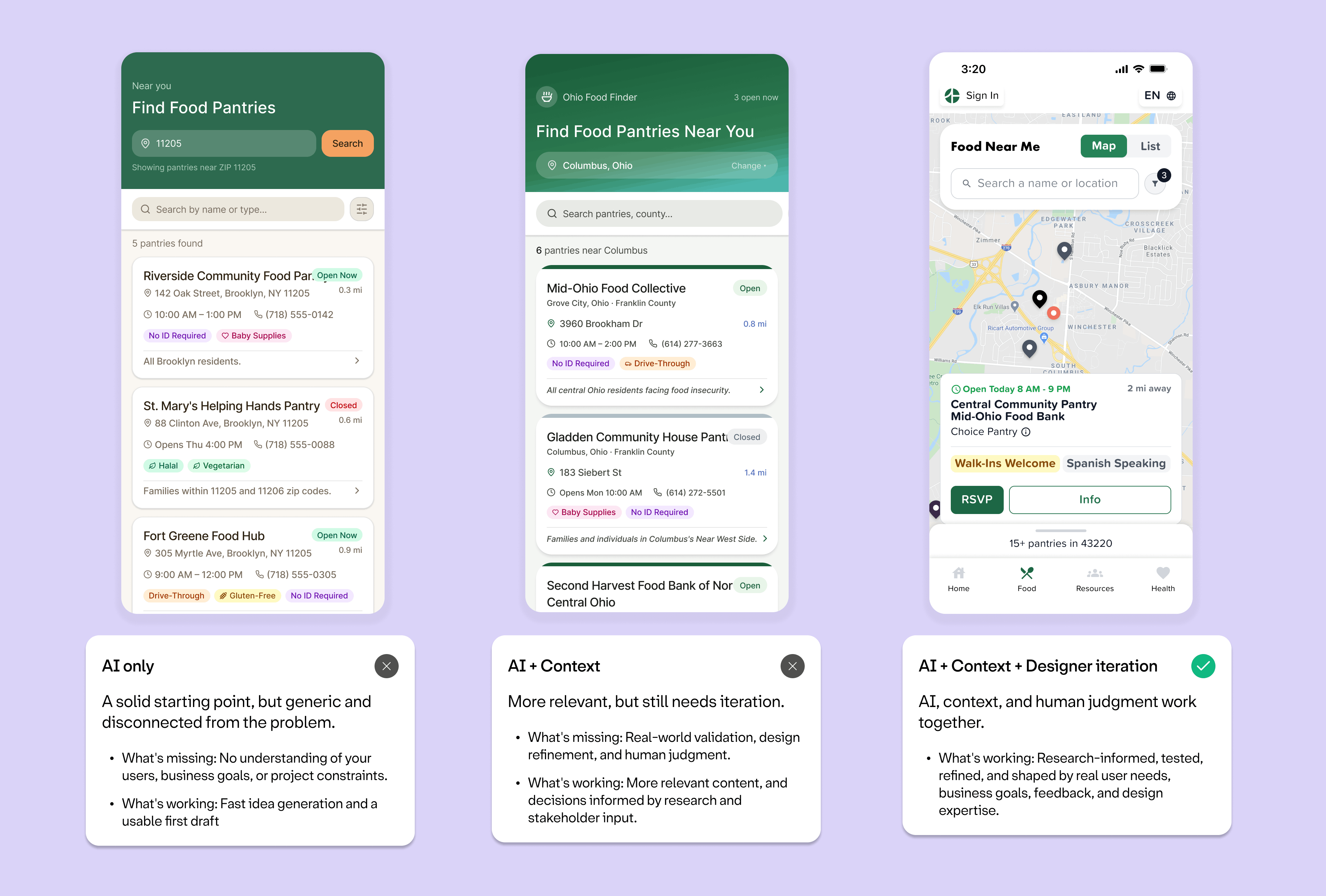
From there insert your prompts into Figma Make or Claude Design to generate a few concepts, evaluate what works, and continue refining. The biggest gains don't come from accepting AI's first solution. They come from using AI to accelerate exploration so you can spend more time applying your judgment, strategy, and design expertise.
Better context leads to better prompts. Better prompts lead to better concepts. Better concepts give you a stronger foundation to build from.
AI outputs should not be accepted as-is.
Very few designers create the perfect solution on their first attempt, so AI shouldn't be held to that standard either. Think of AI-generated concepts like the first sketches on a whiteboard, a starting point to react to, refine, gather feedback on, and push further.
Use AI as a critic.
One of the most useful things AI can do has nothing to do with generating screens.
Once you've created something, feed it back into AI.
Ask it questions like:
- What's confusing?
- Where is the hierarchy weak?
- What accessibility issues am I missing?
- What assumptions am I making?
- What would a stakeholder challenge?
AI has the uncanny ability to articulate the small details that make a design feel off. Things designers may sense but be unable to name themselves.
Use AI before a development handoff.
One of the most overlooked uses of AI is helping prepare designs for development.
Use it to generate:
- Design annotations
- Acceptance criteria
- Edge cases
- Accessibility considerations
- Responsive requirements
- Missing states
Ask things like:
- What states are missing from this design?
- What questions will developers have?
- What interactions haven't been defined?
Which designer are you?
If you're the designer who has tried AI a few times and gave up because the outputs were mediocre, I'd encourage you to try using it somewhere other than screen generation. Some of the most valuable uses of AI have nothing to do with creating UI.
If you're the non-designer who's amazed at what AI can produce, remember that creating something that looks like a product does not mean it is an effective/usable product. AI can help you get to a solid first draft, but it still takes research, strategy, judgment, and iteration to turn it into something people actually want to use.
And if you're in the third group, the people using AI as a collaborator, keep pushing beyond the first output. Anyone can generate a B+ design now. The designers who thrive won't be the ones who can generate the most UI. They'll be the ones who can ask the best questions, provide the best context, and make the best decisions.
AI is great at creating patterns. Humans are great at creating meaning.
Check out our Ultimate Guide to UX Research & Product Design Services
Looking for insights for healthtech product leaders, delivered to your inbox every few weeks? Sign up for our newsletter.

.svg)
.svg)
Currently exploring
UX Mastery


.svg)
.svg)

